
In the following article, we will be covering how companies can extend their CTRM systems using BI toolsets. Whether it is short-term solution to provide added functionality, or a long-term program to establish a better reporting structure, these tools offer the flexibility and data aggregation that most CTRMs cannot.
This article is driven by some of the most common questions and requests encountered over 10 years demoing and implementing CTRM systems to both large and small organizations throughout the Energy and Agricultural sectors.
- “Can I see a report this (Insert specific request) way”
- “Can I add this (Insert specific) field”
- “How will I know when (Insert specific) occurs”
- “But where can I keep (Insert specific) data”
The general theme throughout these questions being that no traditional CTRM will be able to capture every field that a business requires, and nor should that be the goal. Also, it emphasizes that data modelling and reporting requirements are unique to each individual company, even in the same industry.
BI tools are one of a variety of approaches that can offer a solution that may not require customizing your current CTRM’s version, or any detailed additional development. The key component to the success of this implementation is having an individual or team that understands:
- The business and user requests in the right context
- The CTRM data and process model
- The BI toolset that is to be utilized
Once this has been established you can embark on solving some of the common requests for improvement around CTRM systems and enhance the experience of your users.
Table of contents
- Limitations of a traditional CTRM
- BI Tools: Approach and Challenges
- BI Tool Benefits and Examples
- BI Use Case: Adding Limits
- Other Considerations
- Conclusion
Limitations of a Traditional CTRM
Some of the most popular CTRMS in use today are still considered “Legacy” products, and they tend to come with reporting capabilities in four broad categories, each with their own set of limitations.
- “Out-of-the-Box” or “Canned” Reports
- Grid extracts to Excel
- Ad hoc queries
- Custom development
Out-of-the-Box or “Canned” reports
Depending on the system, a few out-of-the-box reports are usually offered in each major functional area (Trade capture, Risk, Settlement, etc.). The potential issues with these reports are that they will be limited in their scope of coverage, and inflexible to adjustment. It will also require your organization to change its reporting needs to fit the system and establish a new set of terminology to be used in understanding their output. Terminology issues are central to most CTRM implementations, and the difficulty in training increases as the users move from day-to-day operations, to report-only individuals in the organization.
Grid extracts to Excel
When a canned report does not meet the user’s needs, the next step would usually be to export the information to Excel and manipulate it further. This requires the user to spend additional time pulling together data together from other sources, and repeat the task each time the report is generated. With outside data, and repeated user interaction there is an increased possibility of human error in the process.
Ad hoc queries
The next step, after repeated efforts to generate a report, is to request or draft an Ad Hoc query to pull together the information requested on an on-going basis. This may be able to be completed through the UI or must be done directly through the back end of the CTRM. In both scenarios, systems may only be able to provide one of the options, or possibly neither, and questions on access and security will need to be discussed. If successful, this approach will likely create another Excel report which will require storage method, and possible further manipulation to visualize the data.
Custom development
The last step would be to consider custom development by the vendor, internally, or through a third-party consultant. This step would require the time and effort of requirements gathering, design, development, and deployment of a new “Canned” report into your system. It would need to be managed on a version to version basis going forward, and any additional changes would also need to go through a development cycle. Ultimately, this may lead to another company specific report finding its way into the vendors reporting offering.
While these methods may succeed in handling single one-off requests from the business users, it is common that frequent adjustments will be required to satisfy an evolving trading environment.
BI tools: Approach and Challenges
There are multiple BI tools on the market today, including free offerings, desktop, and cloud interfaces as well as advanced features such as machine learning and predictive analytics. However, the common use cases are generally:
- Data aggregation and combination from multiple sources
- Data modelling and management
- Data visualization
These three areas can be used in combination with the CTRM software ecosystem to provide short- and long-term functional extensions to your system. However, to take advantage of these features there are some skill sets to focus on developing internally or procure from third party providers.
Business knowledge
Requirements from business users cannot exist in a vacuum. It is imperative that an individual or group managing the BI tool have an understanding of the industry for which they are trying to assist. From upstream to downstream, front to back office and across all major commodities, understanding the nuances that exist in commodity markets are key drivers of success.
The main focus for this resource is to understand “Why” a segment of data is being requested, just as much as the “What” that data represents. This helps in the design, development and construction of a meaningful report or extension.
The CTRM data model
CTRMs generally consist of a common set of functional areas including Trade Capture, Operations, Risk Management and Settlement, with a varying level of capabilities offered by each vendor. The vast array of data stored by each CTRM, calculation engines and functional offerings lead to a set of distinct underlying components to handle the operation of the system.
For the most part, these structures follow similar patterns across vendors, but it will require an experienced individual to understand the flow of data through the system. When considering the use of a BI tool, the knowledge of these CTRM data models is key to building the most efficient and flexible datasets for reporting.
The BI tool
The last step is developing the understanding of the BI Tool that your organization is planning to utilize. In comparison to the other two areas mentioned above, this is likely the easiest to learn and build internally. You could also reach out to resources from other departments, or trusted consulting partners, that already have the skillsets required to achieve your goals.
From personal experience, I have found that Power BI from Microsoft is a very complete toolset, and it is available to users as part of the Office 365 subscription. Learning the basics of the tool can be relatively easy, and there is a large amount of support online.
It is a challenge to bring together a team with industry and CTRM knowledge, but the effort will be rewarded with shorter implementation times frames, lower cost, and better user adoption.
BI Tool Benefits and Examples
Below are some of the relatively quick and easy improvements that can be made to your CTRM with the help of a BI Tool.
- Data Aggregation
- Adding Attributes
- Adding Notifications
- Management Dashboards and Reporting
Data Aggregation
One of the most common features that can be used to augment your CTRM reporting is the ability to combine data from multiple sources into one reporting platform. It is common that data from production or generation, shipping and operations, or ERP systems are kept outside the CTRM. With the help of a BI Tool, this information can be viewed side by side without having to develop extensive cross references within the software itself.
Examples:
- Production system information to provide a combined view with marketing data
- ERP cash information combined with CTRM invoice information
Adding Attributes
Another frequent request is adding a field or trade attribute to the CTRM that may not exist natively. This is generally addressed by CTRM’s with custom development or with the use of User Defined Fields (UDFs). A benefit with adding it through a BI tool can limit an impact to the underlying system and any custom code that has a knock-on effect to upgrades or other routines. This may be a short-term solution until the appropriate changes can be implemented either in the CTRM itself or in another appropriate system.
Examples:
- Daily trading reports with company specific attributes
- Additional credit and collateral information not typically stored in a CTRM
Adding Notifications
Once reports have been established, it then useful to receive feedback from the system when certain data is either approaching or breaching pre-established thresholds. These notifications can be established against any area in which data is updated or changed. With web-based functionality, notifications can be sent directly through a BI tool to mobile apps, or email inboxes.
Examples:
- Credit threshold of 80% with a CP has been breached
- Trader position exceeds threshold against a specific curve
Management Dashboards and Reporting
CTRM canned reporting was already discussed in the previous section, but one of the key components is that is also focused mainly on frequent users of the system and providing a significant of detail. BI Tools are extremely useful in preparing reports to be easily digested by management or steering committees. These can be established directly from the system, so they need not be created from scratch every quarter or reporting cycle.
BI tools can also assist with improving detailed reporting as the drag and drop nature allows for ease in filtering and digging through large amounts of data.
Examples:
- Daily total position and MTM across major business units
- Cash position against monthly obligations
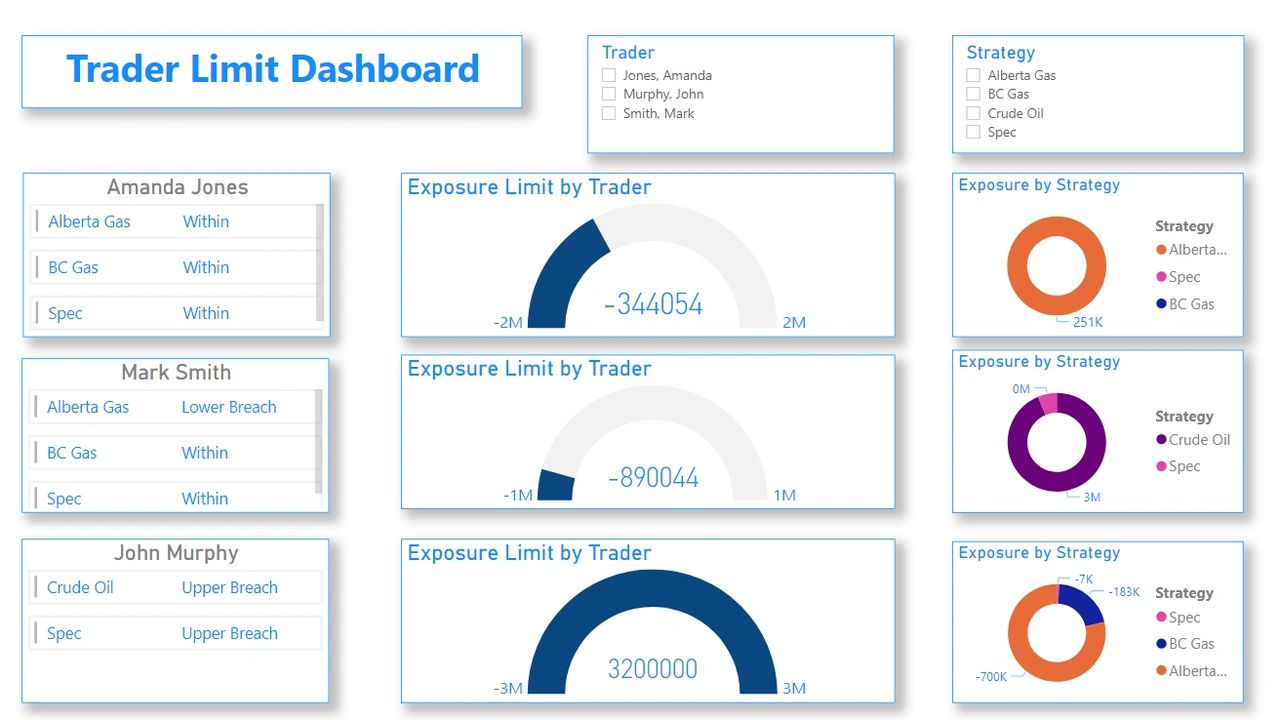
BI Tool Use Case: Adding Limits
If an organization has an established set of limits for their trading program, then it is beneficial that their CTRM system can represent and assist in managing the risk policy. While some CTRM’s have some limit management included as standard functionality, it can be constrained in scope and not offer the full coverage of an organizations policy. Other systems will have none of this functionality, which requires custom development and possibly introducing a host of other issues.
The addition of limit monitoring is one of the more useful scenarios I have seen from the addition of a BI Tool, and act as an interim solution or long-term answer to manage a company’s limit policy. It also takes advantage of the majority of features offered by the BI Tool.
Data Aggregation
The limits themselves may be stored in another database, or an outside Excel sheet, that needs to be combined with the CTRM data. The BI tool can be setup and managed to pull from these sources and allow for easy adjustments as the limit policy changes.
Adding Attributes
With the capabilities offered by BI Tools, it is easy to add additional attributes to the underlying data tables of a CTRM system that may not be natively captured. Having these company specific fields reflected in your reporting will help in understanding of the information being conveyed by the limit data.
Adding Notifications
When a limit is approaching a threshold, or has breached a floor or ceiling, then it is imperative the right individuals are notified. The capabilities in BI tools allow for Email, dashboard or mobile notifications to be sent so the appropriate actions can be taken.
Dashboards
Combining all the risk policy information into one easy to understand dashboard helps in digesting the large amount of data being generated by the companies trading operations. With visual representation and the ability to highlight the most concerning areas, these tools allow for faster reaction and decision making.
Other Considerations
Integration with shared document storage
In several of the case above, it is likely you will need to use Excel sheets or other stored data to maximize the use of the BI Tool. Most BI tools allow for the connection directly to SharePoint, or other data storage services allowing the level of security to be extended to this supplementary data. It also allows central storage for viewing and editing without stranding files on individuals’ hard drives.
Mobile and Web capabilities
Most BI Tools today offer both Web and Mobile capabilities to extend your ability to view data while remote, at home or on the road. Given the nature of most Legacy CTRMS, this provides access to near real time data for both daily users and management.
Conclusion
Overall, if you are looking to extend your system a BI Tool can be a powerful way to add features and enhance your organizations reporting capabilities with relative ease. Whether you are looking to cover some short terms gaps, or establish long term reporting structures, BI tools in combination with Excel and other data sources, can provide the flexibility and ease of implementation to enhance your CTRM system.
It will require expertise in both the industry and CTRM data model, as well as with the BI tool in question, but developing in-house knowledge will provide business continuity and ownership of your data even if the CTRM system is changed.
The path to system enhancement can take many forms and there are a lot of options for improvement to explore. At TruPoint Advisory we look forward to discussing these options further and assist you in getting the most out of your CTRM system.
Regards,
Director | TruPoint Advisory Inc.
“TruPoint Advisory provides experienced CTRM Selection, Implementation and Consultancy services across all energy markets”