
When considering an analytics tool to use with your CTRM, there are a number of options available. However, as the majority of companies work within the Microsoft 365 eco-system, most will have easy access to one of the most powerful tools on the market today: Microsoft Power BI.
The office 365 environment offers a great opportunity to take advantage of a powerful BI toolset to improve business processes, extend CTRM functionality and enhance reporting. Along with the familiar look and feel of Microsoft products, and a common support platform, Power BI can be easy to learn throughout the company.
To help get started, below is an introduction to some of the improvements that can be made to your CTRM with the help of Power BI.
- Data Aggregation
- Adding Data Attributes
- Adding Notifications
- Management Dashboards and Reporting
Data Aggregation
One of the most common features that can be used to augment your CTRM reporting is the ability to combine data from multiple sources into Power BI. It is common that data from production, generation, shipping, operations, or ERP systems are kept outside the CTRM. With the help of Power BI, this information can be viewed side by side without having to develop and maintain extensive cross references within the system.
Examples:
- Combine Production and generation data with marketing and trading information for a consolidated view
- Merge ERP cash and credit information with CTRM invoice details for improved credit management
Adding Data Attributes
Another frequent requirement is adding a field or trade attribute to the CTRM that may not exist natively. This is generally addressed by CTRM systems with custom development or with the use of User Defined Fields (UDFs). A benefit with adding fields through Power BI is that it can limit the impact to the underlying system, and reduce any custom code that can have a knock-on effect to upgrades or other routines.
Examples:
- Daily trading reports with company specific terminology
- Additional counterparty, credit and collateral information not typically stored in a CTRM
Adding Notifications
Once reports have been established, it then useful to receive feedback from the system when data is either approaching or breaching pre-established thresholds. These notifications can be established for any area in which data is updated or changed frequently. With web-based functionality, notifications can be sent directly through Power BI to mobile apps, or email inboxes.
Examples:
- Credit threshold of 80% with a CP has been breached
- Trader position exceeds threshold against a specific curve or tenor
Management Dashboards and Reporting
Power BI is extremely useful in preparing reports to be easily digested by management or steering committees. These can be setup once and populated on a schedule directly from the system, so they need not be created from scratch every quarter or reporting cycle. Power BI can also assist with improving detailed reporting as the drag and drop nature allows for ease in filtering and digging through large amounts of data.
Examples:
- Daily total position and MTM across major business units
- Cash position against monthly obligations
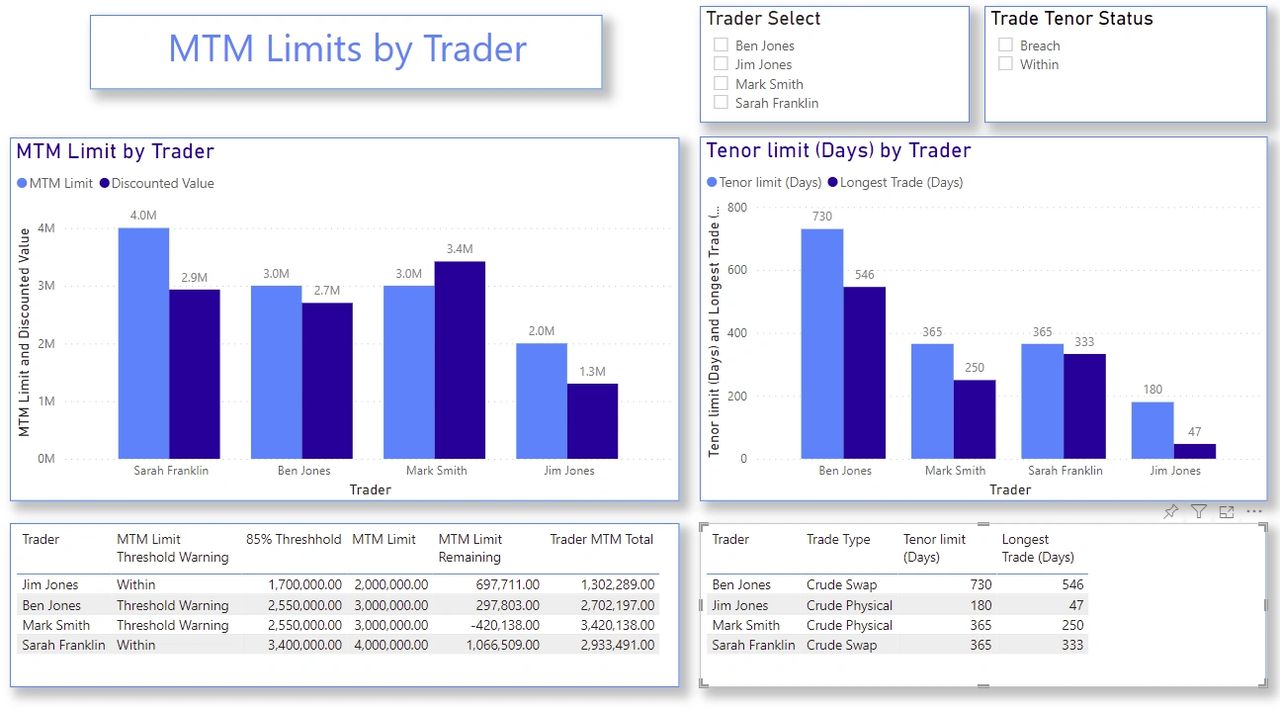
Power BI Use Case: Adding Limits
The addition of limit monitoring is one of the more useful scenarios that can come from the addition of Power BI. Whether it is acting as an interim solution, or long-term answer to manage limit policy, Power BI provides the flexibility and functionality to cover multiple scenarios.
If an organization has an established set of limits for their trading program, then it is beneficial that their CTRM system can represent and assist in managing this risk policy. While some CTRM’s have some limit management included as standard functionality, it can be constrained in scope and not offer the full coverage an organizations requires. Other systems will have none of this functionality, which requires custom development and possibly introducing a host of other issues.
Adding limits is a great example of how Power Bi can leverage all of the examples outlined above, and each can be addressed in the following ways:
Data Aggregation
The limits themselves can be stored in another database, or an Excel workbook, and combined with the CTRM data. Power BI can manage the limits and link the CTRM dataset to pull from these sources and allow for easy adjustments as the limit policy changes.
Adding Attributes
With the capabilities offered by Power BI, it is easy to add additional attributes to the underlying data tables of a CTRM system that may not be natively captured. Having these company specific fields reflected in your reporting will help in understanding of the information being conveyed by the limit data.
Adding Notifications
When a limit is approaching a threshold, or has breached a floor or ceiling, then it is imperative the right individuals are notified. The capabilities in Power BI allow for email, dashboard or mobile notifications to be distributed on varying schedules or driven from events, so the appropriate actions can be taken.
Dashboards
Combining all the risk policy information into one easy to understand dashboard helps in digesting the large amount of data being generated by the companies’ trading operations. With visual representation and the ability to highlight the most concerning areas, these tools allow for faster reaction and decision making.
Overall, extending your system with Power BI can be a simple and straightforward way to add features and enhance your organizations CTRM and reporting capabilities. Whether you are looking to cover some short terms gaps, or establish long term reporting structures, Power BI, in combination with Excel and other data sources, can provide the flexibility and ease of implementation to enhance your CTRM system.
To learn more about how TruPoint can assist your reporting and system extension goals with Power BI, visit us at our website.
TruPoint Advisory Inc. (TPA) provides quality Commodity Trading Risk Management (CTRM) and Power BI consulting services across all major energy markets.